Friday, January 8, 2010

Stereotype Threat - What Every Minority Should Know


The emotional, sexual, and psychological stereotyping of females begins when the doctors says: "It's a girl."


- Shirley Chisholm


I was doing a literature search for a research proposal and I came across a most fascinating study. Published in 1999 in the Journal of Experimental Social Psychology (volume 35, pages 4-28), it documents research performed by Steven Spencer, Claude Steele and Diane Quinn regarding something they call stereotype threat. They define stereotype threat as "the experience of being in a situation where one faces judgment based on societal stereotypes about one's group..."


It's really a fascinating study - one that every minority should read. To summarize what was a very involved study, the researchers found that when men and women took an easy math test, they scored about the same. But when the test was difficult, women scored significantly lower than men.


This might make you think, "Aha - so it's true that men are better at math than women!" But you'd be wrong. Because in a second portion of the study, the researchers showed that stereotype threat was the real culprit behind the significant difference in performance. In this second study, all groups were given the difficult math test. But some groups were told ahead of time that previous tests had shown gender differences (thereby reinforcing the stereotype threat), and other groups were told that the test had never shown any gender differences in the past.


  • The groups in which the stereotype threat was reinforced showed a significant difference (almost 20%) in scores between men and women.

  • In the groups who were told no gender differences existed, the scores for men and women were almost identical.


Fascinating, isn't it? So the next time you hear someone tell you men are simply better at math, or some other ignorant stereotype, don't believe them, and certainly don't let it impact your own performance!

Saturday, December 12, 2009

Life Happens...

Change is inevitable - except from a vending machine.


- Robert C. Gallagher


My post on December 4th talked about my evolution as a blogger. But what it really looked at was the visual evolution of the design of my blog. Although I talked a little bit in there about how my tone has gotten more conversational, really my main focus was to show how I've tried out different blog templates (kind of how teenagers try on different personalities). I still don't think I'm done changing the way my blog looks, so don't be surprised if you check back in and it looks different again...


What about the main topic of my blog? When I first started, I envisioned I'd be writing mostly about women in technology because that's kind of a pet project of mine. Well, if you read my posts, I've tried to go back to that topic every so often, but somehow, I keep getting sidetracked. And isn't that kind of how life works? We start out down one road or one thought process and we find ourselves on some detour.


That's not to say that the detours aren't beneficial. Sometimes you discover new places (or new things about yourself) by taking a detour. In my last posting, I described stepping outside of my comfort zone to design a social media strategy for defero. When I started this blog in September, I never dreamed I'd be blogging about something like that! Or about the Z pattern in eye movements, for that matter. But even though I've wandered around a bit in terms of topics, you can still get a good sense of who I am by reading my posts.


When I first started writing my blog, I tended to write in a formal tone because that's what I was used to doing in my job. But I've tried to relax a bit, and now I try to write my postings as if I'm writing an e-mail to a friend, not posting thoughts to a blog for public consumption. I hope you've noticed and enjoyed the difference.


I've also gone back and forth with being worried about the length of my blog postings. At first, I tried to make sure I covered every point I wanted to make, but then my postings got a little long. So the next few postings got short - maybe even too short - as I tried to really cut back on what I wrote to keep the postings to a reasonable length. Now I've gotten to the point where I'm confident enough to write what I want to say and not worry so much about the length of the posting.


So where do I (and my blog) go from here? I hope to get back more to my topic of interest: trying to encourage girls to pursue careers in science and technology and discussing why women so frequently drop out of those careers. But like my title says, life happens, and who knows where the next detour will lead me? Or, as one of my favorite poems from The Lord of the Rings says:


The Road goes ever on and on

Down from the door where it began.

Now far ahead the Road has gone,

And I must follow, if I can,

Pursuing it with eager feet,

Until it joins some larger way

Where many paths and errands meet.

And whither then? I cannot say.


- J. R. R. Tolkien


Illustration copied without permission from www.coldal.org/quotes.html

Friday, December 11, 2009

Coloring Outside My Lines

Accessible design is good design.


- Steve Ballmer


I recently had an opportunity to expand my horizons in the area of design. I was asked to create a strategy for the launch of a social media company called defero. It's a startup communications company made up of individuals from "old media" who want to use their skills in the Web 2.0 world. My job was to create an all-encompassing social media strategy for them.


The first thing I did was decide how I was going to present my proposal to the management team at defero. I decided to use a blog for two reasons. First, it's a great way to show the defero team the power of blogs and how simple they are to create. Second, it gave me a central location in which to present my proposed deliverables: blog, website, wiki, podcasts, and videos. You can take a look at my blog by clicking here.


Once I had decided to create a blog, I then created the logo. I needed to create the logo first in order to establish the design theme for the social media deliverables. In looking at my logo, I believe that I am somewhat of a minimalist at heart. I went with something clean and simple - I chose a sans serif font because that's the preferred type of font for viewing online, and the arcs over the "o" are reminiscent of the RSS feed symbol and imply broadcasting or transmission of information.


After the logo, I next created my proposal blog. I created individual postings for each deliverable so that I could provide detailed information for each item: the blog, the website, the videos, the podcasts, and the wiki. I also created an introductory posting with links to the individual posts, and an overview posting with general strategy information.


In designing the deliverables, I maintained not only the color scheme of the logo (black/red) but also the minimalist, clean look. I felt that defero would beenfit from an uncluttered look so that clients could focus on the particular areas of social media in which defero excels. For example, here is an illustration of one page of the defero website.


I also created storyboards for defero's blog and wiki, and I provided topics for podcasts and videos. I am very excited to be presenting my proposal to defero and I look forward to working with them on this project.


So why did I use the title "Coloring Outside My Lines" for this posting? Because this has all been a new experience for me. My experience in the past has been mainly in product documentation. Sure, I've designed covers for documentation and helped with product packaging design, but I'd never created a logo before, or designed a website other than my own. It was a challenge, and I hope that my design proposal is well received. While it's intimidating to step outside of my comfort zone, it's also been an exciting learning experience for me, and I look forward to more of these types of opportunities in the future.

Monday, December 7, 2009

Collaboration - Help or Hindrance?


Snowflakes are one of nature's most fragile things, but just look what they can do when they stick together.


- Vesta M. Kelly
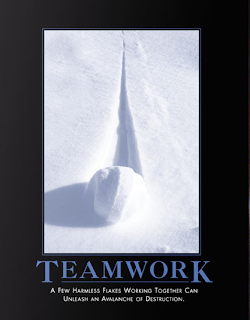


Are you an optimist like Vesta M. Kelly, or are you more of a pessimist like the people at despair.com? I suppose your point of view really depends on your experiences with collaboration. But let's face it, in this day and age, we really do have to learn to work together to get things done.
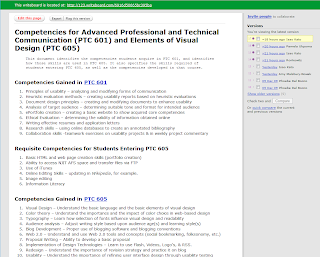


Have you ever heard of something called writeboard? It's a web-based application that lets you invite people to collaborate on a document with you. You give them a link and a password and they can all log in and work on the document. The nice thing is that writeboard saves all previous versions of the document, so you can go back to any previous iteration if you don't like some of the recent changes that were made. And each contributor can write a comment on what he or she added, so you can stay on top of the modifications. It's a really cool idea, and the designers have made it easy to use. That being said, however, I can't imagine writing documents of any length or working over an extended period of time - the versions and comments might get overwhelming.


I was recently invited to collaborate on a short document using writeboard. There was a very basic outline provided by the person initiating the collaboration, and our team was asked to fill in the outline. Writeboard made it easy to add information to the document, but even then, collaboration was a little tricky. For example, someone had previously added a bullet to a list, and I wasn't sure what that bullet meant. But I didn't know if I should delete it or leave it. I ended up leaving it there with a comment that I didn't know what they meant by it. That person didn't respond, so a later collaborator ended up deleting that bullet item. These are the kinds of problems you might encounter in small-scale collaboration.
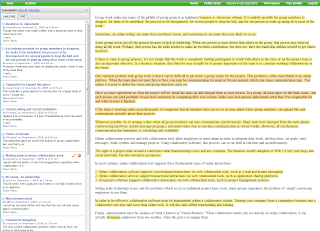


If you're a professional communicator, you should check out co-ment. It's another web-based application, but this one is for text annotation, not text creation/revision. I think co-ment would be really useful for distributing a document to a selection of reviewers. That way you could have all of their comments in one place instead of spread out over several copies of your document. Co-ment would make it much easier to incorporate reviewer comments into your document.


So why collaborate on a document at all? As Tom Clancy said, "Collaboration on a book is the ultimate unnatural act." As a famous author, he had the luxury of working alone and on his own schedule. But for the rest of us communication professionals, we often find ourselves in a situation of having to collaborate at one level or another on documents.


Collaborating on documents can be tricky. People have different writing styles and different ideas of how information should be presented. So the first rule of collaboration has to be creating well-defined tasks for the individuals in the group. And in general it's much more effective to have each person responsible for a complete deliverable, not portions of a deliverable. In other words, it's awfully hard to get people to write sections of a a single chapter, but asking each person to submit a chapter in a book is actually done a lot. That way the person gets closure - they get to write the introduction, the body of the document, and the summary. The collaboration will come in making sure your chapter fits with everyone else's, and reviewing all the chapters to make sure the document makes sense overall.


Another benefit to having well-defined tasks is evaluation. The project leader, the manager, the professor - whoever has to evaluate the completed work has to know which parts were submitted by whom. Otherwise there's no accountability. Similarly, the team needs to know that everyone is carrying their own weight and no one is slacking off or taking credit for something they didn't do. The situation reminds me of a rookie quarterback who shall remain nameless: when his team wins, he takes a lot of the credit, but when they lose, it's the team's fault.


So why bother at all? Because collaboration can actually produce a much more complete document. Everyone has specialized knowledge these days, and by collaborating, you can make sure you cover all the bases. If one person overlooks or omits something, someone else on the team is likely to include that information or make it clearer or better.


Okay, so I've given my views on collaborating on documents. What about other types of collaboration, like sharing ideas in forums? To be honest, I see only positive results from that type of collaboration. Sharing knowledge and ideas is a great way to expand your horizons, to learn new things, to gain new insights... I have been involved in a lot of discussion forums about all kinds of communication topics, especially while a student at NJIT. I am amazed at how much I still don't know and how on top of things my classmates are. Reading their opinions makes me go back and reevaluate my own opinions on things. Forums are a really great way to share information.


What about chat rooms? I've had mixed experiences with that. One problem is that, because chat rooms are synchronous, I have to be available (and remember to go sit at the computer) at the scheduled time, and that is often a problem for me. And sometimes chat rooms can turn into social sessions instead of collaboration meetings. But when you have a chat moderator or someone who is tasked with keeping the group focused, a chat room can be really helpful, especially if there are things you don't understand, because you can keep asking more and more specific questions until you eventually drill down to your area of confusion.


The main downside to chat rooms is that if you get too many people involved, the meeting can become a mess of people "chatting" over each other. We used chat in my Corporate Communication course when my four-person advertising group had to meet, and it worked out really well. But when we invited the other group and ended up with eight people in the chat room, we got very little accomplished.


In my course on the Elements of Visual Design, we had some opportunities to work collaboratively with other students, but there were a few reasons I shied away from that. First, I wasn't exactly sure how the evaluation part of the collaborative effort would work out. For example, if I created a blog and the other person created a website, wouldn't the website be a lot more work? Would I therefore get a lower grade because my effort would be less? (Now that I'm almost done, though, I don't think that would have been the case - it's all a lot of work!) Also, I only really knew one other person in the class with whom I would consider collaborating, but she had already chosen to develop the same type of social media (blog) as I had chosen... And as a student, I was concerned not knowing my other classmates very well that there might be conflict either in aspects of design or timeliness of deliverables, and so I chose to go it on my own. I might still "collaborate" somewhat by providing links from my blog to another student's work, but that's collaboration on my terms, which isn't really collaboration at all, I guess...

Friday, December 4, 2009

My Evolution as a Blogger

All that is valuable in human society depends upon the opportunity for development accorded the individual.


- Albert Einstein


The other day, someone I work with was doing a search on the internet for the terms technical communication and social networking. As I sat in her office, she said, "Oh, here's something that sounds interesting. It's called A Woman In Technology!" I laughed and said, "That's my blog!"


I started this blog in September of this year, and I am very willing to admit that I had not really blogged before. Actually, I had created a blog for a class I took on Corporate Communication, but I wasn't really sure what I was supposed to be doing with it so my posts were kind of random and short.


This time, however, I've really started to enjoy blogging. In fact, I even got my husband to start a blog about his restoration of arcade-style video games - he calls it My Garage Arcade. But back to me and my evolution as a blogger.


As you can see in this illustration, my initial blog was pretty traditional and my tone tended to be more formal (limited use of contractions and so on). I was kind of torn about the width of the blog, however, because my posts were a little long and I (personally) hate having to scroll a lot. I therefore next tried a blog format with a wider post area.


I liked this template because it had the wider posting area. I also like the fact that the titles on the right side of the blog have bars that give that area a nice definition. I played around with the colors because I didn't like the background pure white as it looked too stark, so I went with a grey. I liked the fact that, with this format, more of my posting was visible on the screen at any given time, so my readers wouldn't have to scroll as much.


What I didn't like about the previous format was that my posting titles were really boring - they weren't eye catching at all. So I decided to try something different. I stayed with a template that had the wider posting area, but I found one that really highlighted my post titles - I felt that really made them stand out and gave them a nice delineation. The purple was just something I played around with because I wanted to try some fun colors to liven the blog up a bit.


Then I saw one of my classmates' blogs using a different template that I really liked. Although it has the narrower posting area, I really like the way the dark background made the text stand out. In fact, I like this template so much that, when my husband created his blog, I told him to use this template, although he's using the original colors while I played around with the colors for my blog. At this point, I also started to feel more comfortable with using a more relaxed, conversational tone.


Still, I didn't like the fact that the narrow posting area made my posts look so very long, so I went back to a template with a wider posting area. I tried to stay away from the stark white background by using grey again, but it just looked dull. I used it for a while, as you can see, but since then I've modified my blog to look the way it does now.


I'm still evolving as a blogger - I envision more changes to come - but this post shows you where I started and where I ended up three months later. Not bad for a first-time blogger, huh?

Sunday, November 29, 2009

Eye Tracking in Design - Why Does It Matter?

It's not what you look at that matters, it's what you see.


- Henry David Thoreau


One of my favorite hobbies is scrapbooking. Instead of putting my photos in a photo album, I create decorative scrapbook pages with my photos. Through my scrapbooks, I am trying to enhance the experience of looking at the photos and also to provide more information about the event by including journaling. Recently I started working on what's called a heritage album - an album of my ancestors. I actually have a few treasured photos of my great grandmother and my great-great grandmother, shown in the photo below.


When I first started scrapbooking, I thought it was just a fun hobby, but there are people who take it very seriously. There are numerous magazines devoted to the topic. There are different types of scrapbooking: traditional, digital, and hybrid. And there are lots of articles and websites and even entire books about designing scrapbook pages. One of the first design rules I learned when scrapbooking was that people's eyes tend to move over a page in a Z pattern: they start at the top left, move across the top to the far right, then they scan diagonally back across to the lower left and then back across to the lower right. Here's a link to a scrapbook design blog that talks about the Z flow.


So how, you might ask, do we know that people's eyes move that way? From the study of eye tracking. Think about it – all day long, whenever you are actively engaged in something, your eyes are tracking. When you’re driving, your eyes are looking at the road in front of you, at traffic signals and cars entering the roadway… When you are eating, your eyes are looking at your food, analyzing color and texture that can either add to or detract from your overall dining experience. When you are reading, your eyes are tracking the printed word across the page. And when you are working on a computer, your eyes are scanning the text and images presented to you on your screen. By studying how our eyes track, we can gain very useful information about whether or not something is easy to use, clearly presented, or visually appealing.


There are two ways that researchers gather data about eye tracking. In the head-mounted system, they mount a particularly unattractive device on your head that measures your “pupil glint” from different angles to see what your eyes are focusing on. The other method uses a remote camera to track the orientation of your eye. Either way, the information the researchers collect can be pretty useful.


For example, researchers in the 1950s studied the eye movements of airplane pilots to see where their eyes moved during the difficult process of landing a plane. Based on their research, airplane manufacturers actually redesigned the instrument layout in the cockpit, and since then, instrument usability has improved and incidents of human error have decreased. I’d say that’s a pretty good tradeoff for having to wear some awkward headgear for a while.


Eye tracking studies have also been done on how people read printed material. In normal situations, studies have shown that readers typically skip words that are three letters or less, and instead read groups of words, not single words one at a time. But when the material gets complex, our reading speed slows down and we reread phrases more frequently. The other factor that can impact our reading speed is fonts. Eye tracking studies have shown that we do best with printed 9 to 12 point fonts with serifs. Anything smaller and we have a problem reading; anything larger and we can’t read words in groups.


So, as you can see, eye tracking really does give us a lot of useful information. What kind of information does it collect? In technical jargon, the data is called fixations and saccades. A fixation occurs when your eye is focused on a particular point, while saccades move the eye from one fixation point to the next. By looking at the organization and duration of fixations and saccades, researchers can identify scanpaths like the Z pattern I learned about through scrapbooking.


From a web design point of view, eye tracking can tell us a lot about the usability of our design. For example, the state of Washington performed an eye-tracking study on their Department of Licensing website. The people in the study were asked to perform certain functions, one of them being finding information about a motorcycle permit. Through eye tracking, the researchers found that several of the study participants scanned the Quick clicks section, even though the information wasn’t there. Knowing this, the Department of Licensing could redesign the Quick clicks to include motorcycle permit information, because obviously several people thought it should be there, even if they didn’t verbalize that assumption.


What about something like footnotes? We’re all used to reading them in print. But what happens when we’re reading online? Eye tracking studies have shown that people don’t read the information if it’s at the bottom of the screen, but they’ll read it if it’s near its reference. What other design guidelines has eye tracking given us? Here are some of the key ones as outlined in an article called “Eye Tracking: How It Works and How It Relates to Usability” by Lynne Cooke (published in the Technical Communication journal, Volume 52, Number 4, November 2005).


  • Eye movements roughly follow the “Z” pattern of design.

  • Small type encourages focused reading, while large type promotes scanning.

  • Underlined headlines create a visual barrier stopping people from reading what’s below the line.

  • Short paragraphs are better than long paragraphs.

  • Headlines with a summary attract viewers and keep them reading.

  • Images should be at least 210 x 230 pixels in order to grab viewers’ attention.


So the next time you’re developing a website or some other online document, remember to think about where you want your viewers’ eyes to go and make sure you design with that in mind.

Wednesday, November 4, 2009

Creating a Training Website - Insight and Hindsight

Good teaching is one-fourth preparation and three-fourths theater.


- Gail Godwin


To get back to my focus regarding women and technology, I want to write a bit about a training website I created for the NJIT ADVANCE grant that focuses on connecting women researchers in science and engineering to each other, to their male peers, and to their female counterparts in industry and government. You can access the website at sites.google.com/site/advancetrainingsite/.


Here is a screenshot of the home page of the training website.


And here is a picture of what the NJIT ADVANCE grant is examining – NJIT faculty social networks based on coauthorship of publications.


Although I created this website as an exercise for a web design class, it is actually going to be useful to the NJIT ADVANCE grant team. All the information on data conversion, as well as the sample files I provided so trainees could practice the steps themselves, are all real and correct. In fact, Dr. Nancy Steffen-Fluhr, the PI on the grant, is already planning to use it to train some new team members. Which means I should be getting some good usability feedback!


How did I come up with the design, you might ask? Well, I had some assumptions about my trainees that helped me design the website more effectively. For example, my learners are primarily verbal, so they prefer textual explanations rather than complex diagrams. I therefore focused on documenting the steps, providing links to visuals if the learner wants to view them. The visuals are annotated to make sure the learner knows what he or she is looking at.


My learners are more reflective than active, meaning that they like to think through a problem before jumping right in to solve it. So I documented all the steps and provided sample files so the learners could actually try the steps whenever they felt ready.


Luckily, my trainees are more sequential thinkers than global thinkers. That fits well with the entire concept of the site which is very sequential – the steps need to be performed in a certain order, and that is how they are documented. I don’t provide links for the trainees to jump around within modules because that would really mess up the data conversion.


And finally, my learners are more intuitive than sensing. What does that mean? It means they like to learn abstract concepts rather than necessarily real-life examples. To address this preference, I tried to explain the why of the steps instead of just the implementation.


In terms of the overall design of the site, I worked with the red and blue colors to maintain a coherent identity with NJIT (red) and the ADVANCE logo (blue and red). I provided a single page that contains all the formulas so that learners could reference it easily even after they are confident that they know all the steps. They can also print out the formula page and have it as a reference. I also provided a page with software requirements, including a link to the Analytic Technologies site where the learner can download UCINet 6 as a free trial version.